
Help Center
Go back to application
Help Center
Go back to application
Tools & Platforms
What is ClickTech HUB? Getting started with HUBWhat is a Path?I already have an Adzooma Free account, can I apply my ClickTech Hub coupon?How Challenges workWhat is a Streak?How to earn with the Share & Earn Program How to access Omni AIWhat is Adzooma? How do I redeem my Adzooma Silver coupon?
Account Management
How to access your HUB accountHow to reset your passwordHow to edit your account detailsHow to download your PDF guides
Billing and Subscriptions
How to manage your Subscription What happens if a payment fails?How to access your invoicesWhat happens at the end of my trial period? Do you offer a money-back guarantee?
FAQs
ClickTech HUB - FAQs

How to access your invoices

You can access all of your billing history and invoices through the Billing & Subscription section of your account.

To view your billing information:
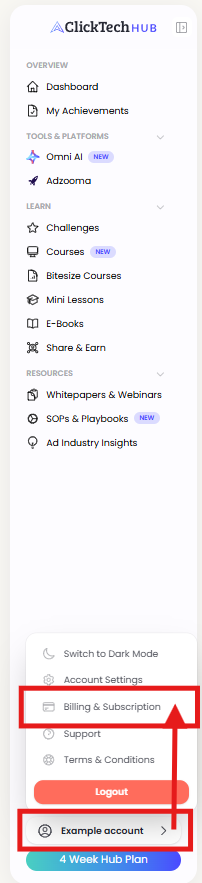
  1. Click the profile icon in the navigation menu
  2. Navigate to Billing & Subscription
  3. Scroll down and download your invoice as a PDF if needed

Need More Information?

Read the Subscription Terms and Conditions.

For any questions about your billing or subscription, contact us at support@clicktechhub.com.

Was this article helpful?

Powered by Product Fruits